Neonate Wiki
BC-6500D
Valid for both BC-6500D/BC-6900D
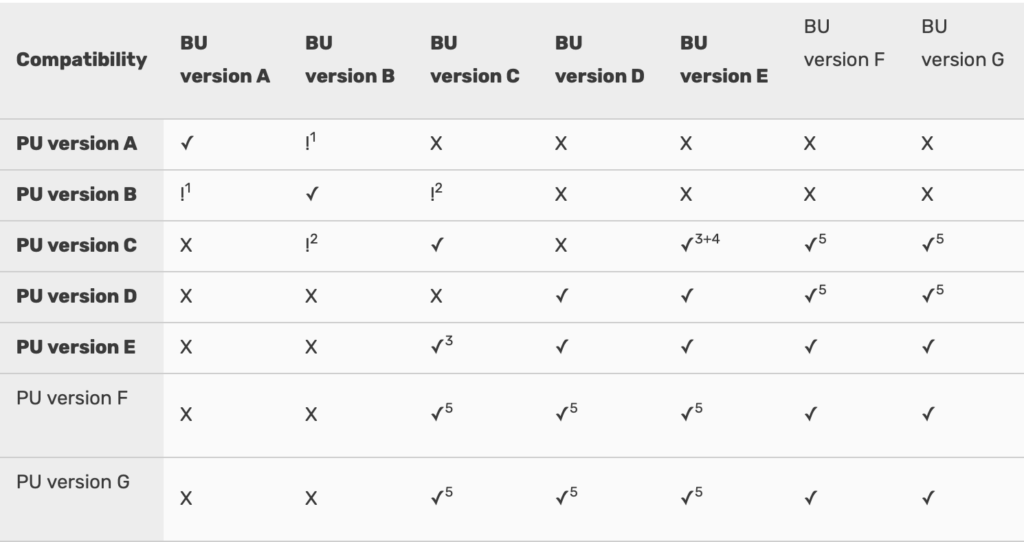
1 Only transmit if PU is old version, and BU is new version
2 Transmission works but cannot turn off out-of-range alarm through parent unit’s LCD display
3 Only transmit if BU is old version, and PU is new version
4 Need to push three times on baby unit’s “M” button to pair with parent unit
5 Transmission works but cannot use TIMER function, TIMER will only show on BU display. Reset on BU only works by holding TIMER button for 2 sec. Short press on TIMER button (BU) will not work.
Table of function changes
Battery
1450mA Battery Consumption
Valid for versions from 1 to 5
| Unit type | TX Mode | RX Mode | Standby | Standby hours |
|---|---|---|---|---|
| Baby | 120mA | - | - | 40mA | 36,2h |
| Parent | - | - | 150mA | 28mA | 51,7h |
1450mA Battery Consumption on Version 6
| Unit type | TX Mode | RX Mode | Standby | Standby hours |
|---|---|---|---|---|
| Baby | 70mA | - | - | 8mA | 181,2h |
| Parent | - | - | 90mA | 8mA | 181,2h |
Known issues/problems
| Serial number/version | Issue/problem |
|---|---|
| L | Feil på IC på BC-6500D Viser 100% «Fully charged» med en gang den plasseres i docking. |
| 1121M | When disconnecting from charging, the battery level falls from 100% down to 9%.
Explanation: for this batch of BC-6X00D, the charging control IC show quality problem, so we have to dismantle this IC from PCB and resolder a proper one. Probably the problem arises from this resoldering by hand (normally all IC are soldered onto PCB by SMT machine) which may create a false solder, leading to the defect as described in your video. Solution: Replace unit |
| 1121M | Batteri produksjon '20210310' BC-6500D, baby unit. Testet og trodde det var feil på babyenheten, hvor ladebasen lyser grønt og det står «Full charge», når enheten tas ut faller den fra 100% til 60%. Prøvd å bytte batteri, til et nytt batteri fra lager, samme feil. MEN, det viser seg at batteriene som ble testet er fra samme produksjon, «20210310», når jeg prøvde å bytte til et batteri fra annen produksjonsdato – 20211223, så sto det 100%. Tester nå ut hvor lenge dette batteriet/enhet holder før det går tomt. Oppdatering følger. |
| N | Night Light. PU and BU units from N or more update version can work with each other and do not have night light problem. |
Lorem ipsum dolor sit amet, consectetur adipiscing elit. Ut elit tellus, luctus nec ullamcorper mattis, pulvinar dapibus leo.
Versions
| Changes in Function | Serial numbers | Version |
|---|---|---|
| First launch version | 0513A,0713A,1013A (serial numbers that end with R is also this version) | A |
| Add in power save feature in PU | 0114A,0614A,1014A (serial numbers that end with RN is also this version) | B |
| Parent unit: LCD changed to two rows showing text. Press M to switch off out-of-range function, out-of-range automatically activates itself when baby unit is switched on. High-Low temperature alert of each baby unit can be set individually. Range: High temperature alert 0 - 49∘C, Low temperature alert -18 - +15∘ C | 0115A,0415A,0715A, 0815A,0915A,1015A, 0316A,0716A,1016A, 1116A (Repaired : 1217C/1217B XXXX R also this version) | C |
| New LCD shows battery status in %. PU/BU will not show battery % status while charging and switched OFF. Battery capacity changed from 1300mAh to 1450mAh | 0117A,0417A,0617D | D |
| Add in charging indication when power is off. When volume level set to zero, MUTE start flashing, short press M button to confirm MUTE. Added mounting kit in package (BC-6x00D). | 0717E | E |
| Change circuitry design to extend battery stand-by-time to 200 hours stand-by-time. Change LCD to show more alphabet in a row. Add in sleep TIMER function/change PAGE button to TIMER button | 0118F | F |
| Modified timer function : PU will record time once BU is switched off (only when the time lapse is over 1 min) | 0418G, 0718G | G |
| Change low temperature limit allowable selection range to -19° to +25°C. Mic sens adjustable from PU | 0119H | H |
| Charging time reduce by 40%. AC adapter change to 5V 1A (1000mAh), independent USB cable. Charging current increased from 350A to 700A. | 0519I | I |
| New batteries from new supplier. | 0919J | J |
| Change firmware such that battery consumption appear more linear/compatible with 10th version | 0221K | K |
| Changed to 3-wire batteries. According to the new CE requirement, the Li battery used in electronic devices need to be incorporated with PTC and NTC circuitry and there are 3 wire coming out from battery. Besides, the battery need to be covered up with a V0 fire retardant sleeve (see attached photo). As a result, the battery will be more safe and less chance to become overheated and melt the cabinet. | 0421L | L |
| Add 3 colour sticker in battery compartment and battery/compatible with L version | 0721M | M |
| Change not to indicate % level during charging/change new IC/compatible with M version | 0522N | N |
| Flash light fix: PU and BU units from N or more update version can work with each other and do not have night light problem. | N | N |
| Start using gold plated battery connector | 0522N (May 2022) | N |
| Modify software to restrict battery charging below 0° and above 50 °C/compatible with N version | starting 1122P | P |
| Add snow flake n fire icon on LCD to indicate battery temperature exceed limit/compatible with P version | starting 0123Q | Q |
| BC-6500D change to USB-C | 0623R | R |
| Add in rubber pad underneath button to avoid damage to talk back switch/ compatible to 0623R version | starting 1023R | R |
| Start printed additional information on packaging including address and frequencies, from serial number | 0824S | S |
| Start batch no. from serial number | 0125T | T |
| Print the batch code on the gift box. | starting on 0125T | T |
| Silk screen on units | starting on 0125T | T |
| Start V2 from serial number | 0525U | U |
| New IC, not compatible with previous versions. Serial numbers have a V2 at the end. | 0525U xxxx 65 V2 / 0525U xxxx 69 V2 | U |
| USB-C on both unit and dock on BU-65D from V2 | Starting from V2 | - |
Enter testing mode of RX – hold + button while switching the unit ON
Resume by switching OFF and ON again – make sure the + is not stuck
BC-6500D out-of-range alarm (on parent unit) is automatically activated when turning ON (again) a (paired) baby unit where the out-of-range have been switched off by usting +/- buttons on PU (to avoid the alarm to sound when not using the unit).
Batteri issue:
We have discussed with engineer, they also aware of the problem that you mentioned.
In fact, such problem already exist from version D when we first indicate battery % level on LCD.
This is because the CPU is not able to calculate accurately the battery % level when the unit is under charging (either placed in charger cradle or connected to AC adapter). The % level indicate on LCD is not correct and usually higher than the actual %. However, once you take the unit out from the cradle or disconnect from AC adapter, the CPU can calculate the % level accurately and indicate it on LCD.
You can inform end users following :
- Ignore the % level when the unit is under charging.
- Pay attention to the battery icon which show blinking while charging and steady when battery is fully charged. Also LCD will show text “FULL CHARGE”
In future, we suggest to modify as below :
- Delete the % level when unit is under charging, just indicate the battery icon which show blinking while charging and steady when fully charged ( LCD also show text “FULL CHARGE” to remind end user)
- The % level will be shown on LCD only when unit is not under charging.
A-106 Mounting kit
| Endring | Iverksatt |
|---|---|
| Sugekopp fjernes fra mounting kitet for å spare miljø. | 30/4-25 |
© 2022 Noricon AS